
Try this online tool to quickly turn special characters into web-safe formats. It works fast without cost, keeps data safe while helping shape clean links. Built with both coders and campaign builders in mind. Runs smoothly straight from your browser, needing nothing extra. Perfect when handling redirects, queries, or tracking tags. Works on any device, anytime, no login needed. A solid helper for everyday link tasks.
Introduction
Most people working online need an easy way to fix web addresses. When links include things like spaces or odd signs, they might stop working. A free tool on the internet helps change those tricky parts into something browsers understand. Some characters just do not behave well inside a link. Turning them into safe codes keeps everything running smooth.
Got a risky link? This one turns it safe with encoding, just like that. When needed, it pulls the original text back out too – no fuss.
Working on websites, APIs, or SEO? This tool smooths out the process while cutting mistakes. You can also improve your website metadata using our Meta Tag Generator Online Free Tool. It keeps things moving fast without clutter getting in the way. Efficiency grows when tasks flow better, quieter, simpler.
What is URL Encoding?
Turning odd symbols into something websites recognize happens when you change them through URL encoding. Browsers need this switch to read addresses correctly. Special signs become safe versions that travel well online.
Common conversions:
- Space = %20
- & = %26
- ? = %3F
Example:
Original URL:
https://example.com/search?q=hello
Encoded URL:
https://example.com/search?q=hello%20world
Reference:
https://www.w3schools.com/tags/ref_urlencode.ASP

Understanding URL Decoding?
Backward from encoding, URL decoding takes transformed web addresses. These are turned again into words people easily understand.
Example:
hello%20world → hello world
Most APIs rely on it, along with many backends. Web apps often include it too. Its presence shows up quietly across services.
Why Use an Online URL Encoder Decoder?
Using a URL Encoder / Decoder Online Free Tool is important because:
- Prevents broken URLs and errors
- Improves API data handling
- Ensures browser compatibility
- Saves time and manual effort
- Helps SEO-friendly URL structure
Learn more about URL standards from Mozilla Developer Network (MDN).
Key Features of URL Encoder / Decoder Online Free Tool
✔ Instant URL encoding
✔ Instant URL decoding
✔ 100% free online tool
✔ No installation required
✔ Mobile & desktop friendly
✔ Fast and secure processing
✔ Privacy-safe (no data storage)
How to Use URL Encoder / Decoder Online Free Tool
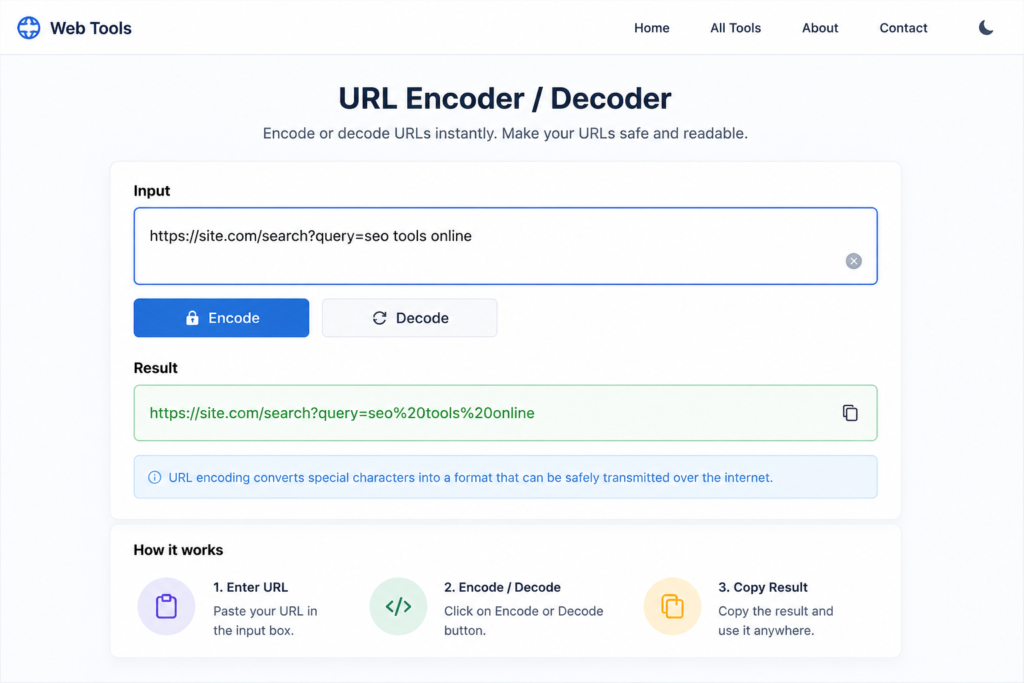
Step 1:
Type your text or link right there inside the box.
Step 2:
Start by pressing the Encode option. Or maybe try tapping Decode instead. The choice shifts depending on what you need right then. Either one works just fine. Each opens a different path forward.
Step 3:
Good. The connection functions properly again.
That’s it — your URL is ready to use.
Who Can Use This Tool?
This tool works well when you need help with tasks like these
- Web Developers
- SEO Experts
- Digital Marketers
- API Developers
- Students
- Content Writers
- Bloggers can also optimize website speed using our Compress Image to 50KB Online Free Tool.
Real Example
Input:
https://site.com/search?query=seo
Output:
This ensures safe URL handling without breaking links.
Advantages of Using Online Tool
- No software installation required
- Works directly in browser
- Beginner-friendly interface
- Saves time and effort
- Need content optimization too? Try our Word Counter Online Free Tool for accurate word and character counting.
- Reduces human errors
- Improves workflow efficiency
FAQs:
What is URL Encoder / Decoder Online Free Tool?
It is a tool that converts URLs into safe format and converts them back into readable form.
Is This Tool Free?
Free access? That’s right – no cost at all. Zero charge every time you use it. Not a single fee involved. Always available without spending anything.
Mobile Devices – Does It Run There?
Fine on phones, sure. Tablets handle it just as well. Desktops? No problem there either.
Storing personal details? Not happening here.
Besides keeping things running smoothly, it doesn’t hold on to anything you enter. Nothing typed gets written down somewhere else later.
Storing Personal Details?
Not happening here.
Besides lacking storage features, it handles inputs without keeping copies. Information passes through but stays nowhere on the system.
URL Encoding Helps Web Addresses Work Right?
It prevents broken links and ensures proper browser understanding of URLs.
Conclusion
A URL Encoder / Decoder Online Free Tool is essential for developers, SEO experts, and website owners. Seconds pass. The link comes out scrubbed, secure, without flaws. A quiet fix, working behind the curtain.
Spending lots of time on links, APIs, or sites? If you regularly work with links, APIs, or websites, this tool will save you time and improve accuracy. You may also like our QR Code Generator Online Tool for quickly creating shareable QR codes.